Posts

Showing posts with the label Apple Frameworks

WWDC 2022 Keynote - Summary

  WWDC 2022 Keynote - Summary Intro by Tim Cook iOS (Enter Craig) iOS 16 features: Lock Screen updates video with loads of personalization customization of every single element on the screen,   Like Watch faces, you can now have multiple lock screens,   Notifications are shown only at the bottom of the screen,   Live Activities API (real-time info like match updates, drive location updates, health metrics updates, etc) a Full-screen now-playing music app view Focus updates: Focus filters to focus on one single activity at a time Focus API to implement in the app Messages Updates: You can edit the messages that are already sent You can undo/delete the messages Mark any thread as unread Shared with You: APIs for developers to integrate into the apps SharePlay (watch/play together with anyone) integrated into FaceTime integrated into Messages Dictation updates: Voice & keyboard can be used in-conjunction App Intents API - shortcuts work with zero setup Live text upd...
Combine - RxSwift's Successor

Image
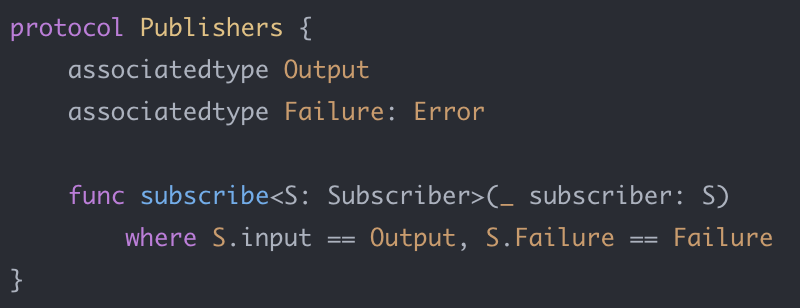
Introduction: When I got to watch this WWDC video where the Apple engineers introduced a brand new Combine framework that enables developers to write asynchronous programs effectively, I was literally taken away after watching it. I will tell you the shocking story along the way. Let’s start by putting Apple’s definition for the Combine framework: “ A unified, declarative API for processing values overtime ” Combine introduces the framework’s main characteristics as: Generic Type-Safe Composition first The ‘Combine’ is Apple’s first asynchronous event-handling framework. If you’ve done reactive programming earlier, you’d be already aware but all you’ve done is only the imperative programming so far, then read this will serve as a good starting point. A generic definition of Reactive Programming goes like this: Reactive programming is an asynchronous programming paradigm oriented around data streams and the propagation of change. In th...

Resume App with SwiftUI

Introduction: If you’re looking for an introduction to SwiftUI, this serves as a good starting point. This is about my experience learning/building the first SwiftUI app, that was built while learning the SwiftUI’s layout system. I tried to build out an iPad app(Since iPhone doesn’t fit well for this app) that’d display Resume based upon the content provided to it in the intended format.  Here’s the Github repo of the open-sourced iPad app for the complete details. The entire app’s/resume’s template is based upon this resume template with just a few tweaks added to it. So, now we have the UI for the app ready that we intend to develop with SwiftUI. On top of it, I planned to have a couple of additions with respect to the requirements of the app: Theming: The entire app should be easily ‘Themable’ aka easy to configure/apply themes Icons: The app shouldn’t use any of the images and should use only the fonts so that it easily adapts to our ‘Themabl...

SwiftUI - The UIKit's Successor

Introduction Let’s start with Apple’s Own Definition : “SwiftUI is an innovative, exceptionally simple way to build user interfaces across all Apple platforms with the power of Swift. Build user interfaces for any Apple device using just one set of tools and APIs. With a declarative Swift syntax that’s easy to read and natural to write, SwiftUI works seamlessly with new Xcode design tools to keep your code and design perfectly in sync. Automatic support for Dynamic Type, Dark Mode, localization, and accessibility means your first line of SwiftUI code is already the most powerful UI code you’ve ever written.” Although it is NOT a replacement for UIKit/AppKit, take it or not, UIKit/AppKit is about to die slowly just like Objective-C and SwiftUI is going to replace UIKit/Appkit in the iOS/macOS platforms.  On SwiftUI Views: “SwiftUI Views are functions of state and not a sequence of events like UIKit”, meaning the views are created based upon your data/model and ...